


Grocer
0.00.00 Reviews
App Specs
- Version
- 2.0.7
- Updated On
- License
- Free
- Downloads
- 100,000+
- Developer
- Roc Wong
- Categories
- Shopping
- Platform
- Android
Screenshots
 Analysis by AppCompare
For me, the most important question about a grocery app is not whether it can hold a long list; it is whether I can use it calmly when I’m tired, in a busy aisle, or trying to plan meals around what is already at home. Grocer is a shopping app from developer Roc Wong, and its mix of lists, recipes, pantry tracking and price comparison gives it a broader role than a basic digital notepad. That range is useful, though it also means the experience depends on how much organizing you want to do before you shop.
Making the app easier to use in real life
I’d make the first trial deliberately small: add a few familiar items, then check whether the list is easy to follow on the device and in the places you actually shop. That lets me spot friction before relying on it for a full household run, and it helps separate useful planning from extra screen work. If the workflow feels comfortable, I can build on it gradually; if not, a simpler list remains a sensible choice.
Readability and navigation
From the moment I downloaded Grocer, I was impressed by its clean, user-friendly interface. Navigating through the app felt intuitive, with everything neatly organized. You know that feeling when you walk into a store and everything is just where it should be? That’s what using Grocer feels like.
The app’s home screen is straightforward, with options to create lists, browse recipes, and even keep track of your pantry. The design is minimalistic, which I appreciate because it doesn’t overwhelm you with too many options at once. It’s like having a personal shopping assistant right in your pocket.
That uncluttered approach matters when I’m checking a list while moving through a shop: I want to find the next task without having to interpret a crowded screen. Grocer’s different jobs—planning, storing pantry details and shopping—are easy to understand as separate parts of a grocery routine. I’d still suggest trying the main screens at home before relying on them in a hurry, especially if you are new to app-based lists. A little familiarity makes it easier to keep your attention on the aisle rather than on figuring out where a control lives.
Motor and sensory considerations
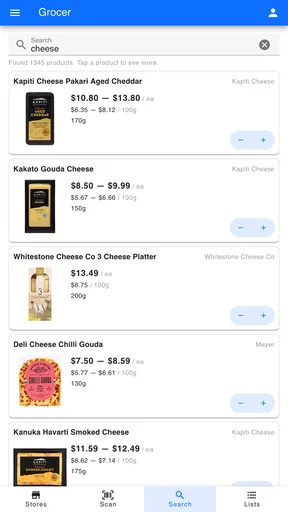
Adding products by typing and choosing suggestions gives me a practical way to build a list without needing to browse through a complicated catalog. Sharing a list can also reduce the amount of coordination that happens through separate messages. For someone who shops with one hand occupied, however, any task that requires typing or precise taps can still be awkward; I would prepare most of the list before leaving home rather than composing it beside a trolley.
Recipes and pantry entries introduce more information to scan, so I find them best suited to a quieter planning moment. If bright displays, dense text or lots of screen interaction are tiring for you, a paper backup for the essentials may make the trip more comfortable. I don’t treat a clean layout as proof that an app will work equally well for every person or device; the useful test is whether its actual screens feel manageable to you.
Worth Reading Before You Choose

EA SPORTS FC Mobile 26 Is a Bigger Football Game, but It Takes Time

Flipboard Shows What News Apps Must Do Beyond the Feed

Switching to Android Auto Means Rethinking Your Driving Routine

Google Calendar Makes a Crowded Week Easier to Manage

Ludo King Makes the Most of the Minutes Between Plans

Baby Panda World Brings Quick Play to Modern Phones, but Its Game Library Feels Busy
Situational access: planning beyond the aisle
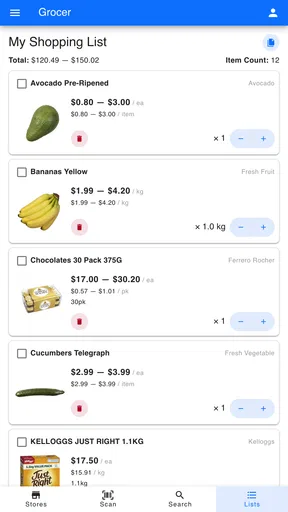
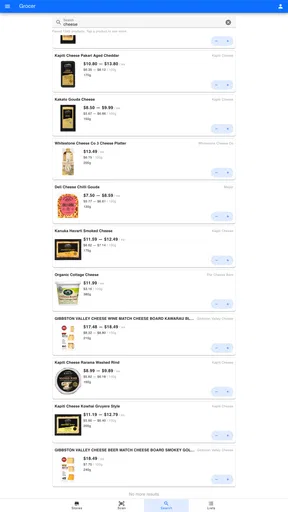
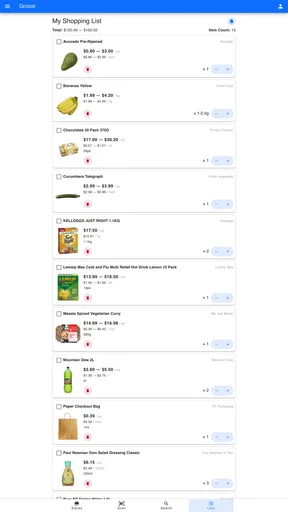
One of the standout features for me is the list-making tool. You can create multiple lists, whether it’s for a specific recipe or just your usual weekly groceries. Adding items is a breeze—just type in the product name, and it pops up with suggestions. This is super handy if you’re like me and can’t remember the exact brand or size you usually buy.
What’s even cooler is that you can share your lists with family or roommates. No more texting back and forth to see who’s picking up the milk!
A useful way to use those separate lists is to give each one a clear purpose: one for the weekly shop, another for a particular meal, and a short one for items you need on the way home. That keeps an urgent errand from being buried under a full household restock. When a shared list is involved, I’d agree on a simple habit with the other shopper—such as checking off an item as soon as it goes in the basket—so two people don’t buy the same thing. The feature is most helpful when everyone treats the list as the current plan, rather than keeping parallel versions in messages.
Recipes and pantry use in context
Feeling uninspired in the kitchen? Grocer’s got your back. The app features a recipe section where you can find new dishes to try. You can search by ingredients you already have, which is a lifesaver when you’re trying to use up leftovers. Plus, you can add ingredients from recipes directly to your shopping list with just a tap. It’s like magic!
I’ve discovered some fantastic new meals thanks to this feature. It’s perfect for anyone looking to spice up their meal planning.
The practical value is less about finding a grand new dinner every night and more about turning a few odds and ends into a shopping decision. I’d check a recipe’s ingredients before adding them, then remove anything already in the pantry; otherwise, a convenient one-tap addition can create needless duplicates. This small pause also helps when a recipe calls for a particular ingredient you may not want to buy for just one meal. Grocer can help me organize that choice, but I still decide whether the dish fits my budget, diet and time.
Another nifty feature is the pantry tracker. It helps you keep an eye on what you have at home, so you don’t end up buying duplicates. You can scan barcodes or manually enter items, and the app will notify you when you’re running low on essentials.
This feature has saved me from those annoying last-minute trips to the store for forgotten items. Plus, it’s great for reducing food waste, which is always a win in my book.
Pantry tracking is only as reliable as the habit behind it. I’d start with a few repeat purchases—things that are easy to forget but matter to your household—rather than trying to catalogue every cupboard at once. After using an item, update the record while unpacking or planning the next shop. That routine is more realistic than expecting a perfect inventory, and it can still help avoid buying another unopened staple. Barcode scanning may save typing for some packaged products, while manual entry gives you a fallback when scanning is inconvenient.
Price comparison and the shopping decision
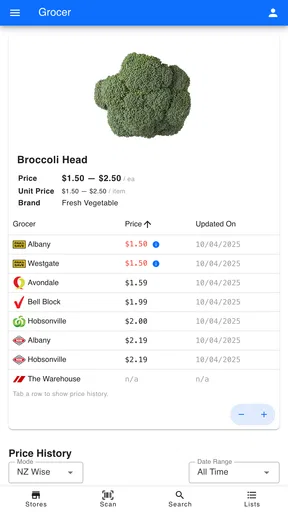
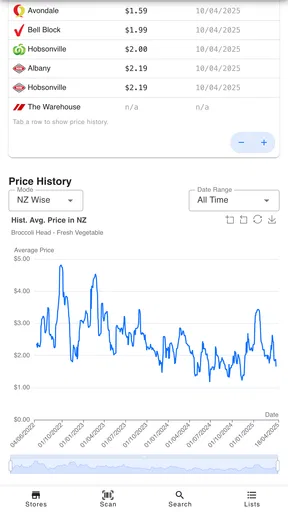
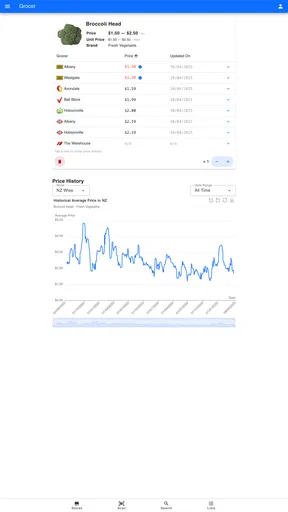
The price-comparison angle is particularly relevant for shoppers in New Zealand, where comparing a regular basket can be more useful than chasing a single bargain. I would use Grocer to check the items I buy repeatedly, then weigh any apparent saving against the practical cost of making another stop. A lower shelf price is not automatically a better choice if it means extra travel, a less convenient collection plan, or buying a size my household will not finish.
Compared with a supermarket’s own shopping app, Grocer’s appeal is the broader task of organizing a shop rather than simply dealing with one retailer. Compared with a notes app, it brings recipes and pantry management into the same grocery routine. Those differences make it attractive if you like planning ahead. If you only need a short reminder list, or prefer to make every decision in the store, a basic notes app or paper list may be quicker and less demanding.
For a realistic weeknight example, I might check the pantry before leaving work, choose a recipe that uses something already on hand, and add only the missing ingredients to a meal-specific list. I can then compare the planned items and decide whether it is worth visiting another shop. The key is to compare a small, familiar set of products rather than trying to price-check an entire trolley while rushed. That turns the app into a planning aid instead of another task competing for attention.
Online ordering, remaining barriers and value
Grocer also offers integration with online grocery stores. You can order items directly from the app, which is a huge time-saver. It syncs with local stores, so you can choose the most convenient pick-up or delivery option.
Imagine sitting on your couch, sipping coffee, and doing all your grocery shopping without stepping foot outside. That’s what Grocer offers, and I’m here for it!
For me, online ordering is most useful when the list is already settled: I can review it at home, remove pantry items and avoid making choices while tired. It is less ideal when I want to inspect produce personally, compare substitutions, or adapt the shop as I go. Price comparison and ordering also answer different questions: one helps me think about cost, while the other helps me complete a purchase. I would check the final basket and collection or delivery details before committing, rather than assuming that a comparison automatically selects the best option.
Grocer is free to download, with in-app purchases listed at $2.99 per item. It is rated for Everyone, has over 100 thousand installs, and its average rating is 0.0, so I would not treat a crowd rating as a useful shortcut for deciding whether it suits me. The app was released on May 6, 2022, and its current version is 2.0.7, with Android 7.0 as the minimum operating system. Those details are helpful for checking basic compatibility, but the better test is whether the workflow fits your own shopping habits.
There are trade-offs worth keeping in mind. Maintaining a pantry record takes attention, and a comparison is only useful when the products being compared match what you actually want to buy. If your priority is accessibility controls tailored to a specific need, a particular retailer’s ordering process, or a very simple checklist, test the relevant screens and tasks before moving your routine over. I would not choose Grocer solely because it combines several tools; I would choose it if those tools reduce the separate bits of planning I already do.
Who will get the most from it
Overall, Grocer has become an indispensable tool in my daily life. Its seamless design and practical features make grocery shopping less of a chore and more of an enjoyable task. Whether you’re a cooking enthusiast or someone who just wants to streamline their shopping routine, this app is worth checking out.
With its user-friendly interface and handy features, Grocer is definitely a must-have app for anyone looking to simplify their grocery shopping experience. Happy shopping, folks!
I’d recommend it most to people who plan meals, share household errands, or regularly forget what is already in the cupboard. It is a weaker fit for someone who shops spontaneously, dislikes maintaining lists, or wants one store’s app to handle every part of an order. The strongest routine is a light one: keep a few useful lists, record only the pantry staples that tend to cause duplicate buys, and use recipes when they solve a real meal-planning problem. That avoids turning grocery organization into a hobby of its own.
My inclusive verdict is that Grocer’s straightforward organization and several ways to prepare a shop can make grocery planning easier across different situations, especially when lists are built before a busy trip. Still, a simple appearance cannot remove every barrier: typing, keeping inventory current, reading while shopping and switching between planning and checkout may not suit everyone. I’d try it with one ordinary shop and judge whether it genuinely saves effort. If it does, the combination of shared lists, pantry awareness, recipes and price comparison is a useful reason to keep it; if not, a simpler tool may serve you better.
Pros
- User-friendly interface enhances navigation.
- Offers personalized shopping lists efficiently.
- Wide range of products available for purchase.
- Real-time inventory updates prevent out-of-stock issues.
- Integrates with loyalty programs for savings.
Cons
- Occasional syncing issues with other devices.
- Limited payment options could be inconvenient.
- May require frequent updates for new features.
- Sometimes slow to load during peak hours.
- Notifications can be overwhelming at times.
FAQs for Grocer
What is Grocer and how does it work?
Grocer is a user-friendly grocery shopping app designed to simplify your shopping experience. It allows users to create shopping lists, find exclusive deals, and place orders for home delivery or in-store pickup. The app features an intuitive interface, making it easy to navigate through various categories and items.
Does Grocer offer delivery services in my area?
Grocer provides delivery services in numerous locations, but availability can vary based on your region. To check if delivery is available in your area, enter your zip code in the app. Grocer partners with multiple local stores and delivery services to ensure a wide reach.
Is there a subscription fee for using Grocer?
Grocer is free to download and use, but it may offer premium features or subscriptions for enhanced services. These could include perks like free delivery, exclusive discounts, or early access to sales. Users can choose whether to opt into these additional services based on their needs.
How does Grocer ensure the security of my personal data?
Grocer prioritizes user privacy and employs robust security measures to protect personal information. The app uses encryption to safeguard payment details and follows strict protocols to ensure data protection. Users are encouraged to read the app’s privacy policy for more information on data handling.
Can I customize my shopping experience on Grocer?
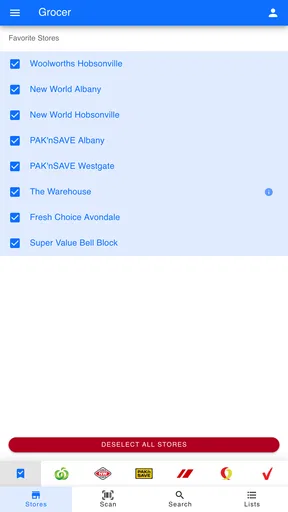
Yes, Grocer offers several customization options to enhance your shopping experience. Users can set preferences for dietary needs, favorite stores, and preferred brands. The app also allows you to save your shopping lists and get personalized recommendations based on past purchases.


